Support Tier Pricing and Its Hidden Influence on Total Database Cost
Support tier controls scaling, availability, and incident response—not just response speed.

Support tier is invisible on the rate card, and that invisibility is structural. The billing surface for a managed database spans at least six independent dimensions: compute, storage, egress, ingestion, inter-region transfer, and support tier. Most cost analyses stop after comparing the first two. Compute and storage rates get lined up side by side, a monthly estimate gets built, and the comparison ends there, as if the numbers on the page were the whole story.
Two engineering teams can be quoted the exact same compute rate and the exact same storage rate and still walk into completely different operational situations once real production load hits. The reason has nothing to do with pricing and everything to do with what each team is actually permitted to run. The support tier prices a bundle of permissions rather than a rate, so capability changes without a corresponding line item on the bill. It's priced like a bundle of permissions, which makes it easy to miss and expensive to discover late.
What support tiers control
A support tier sets scaling behavior, availability architecture, and incident-response commitments. It has very little to do with how quickly a support agent answers a message.
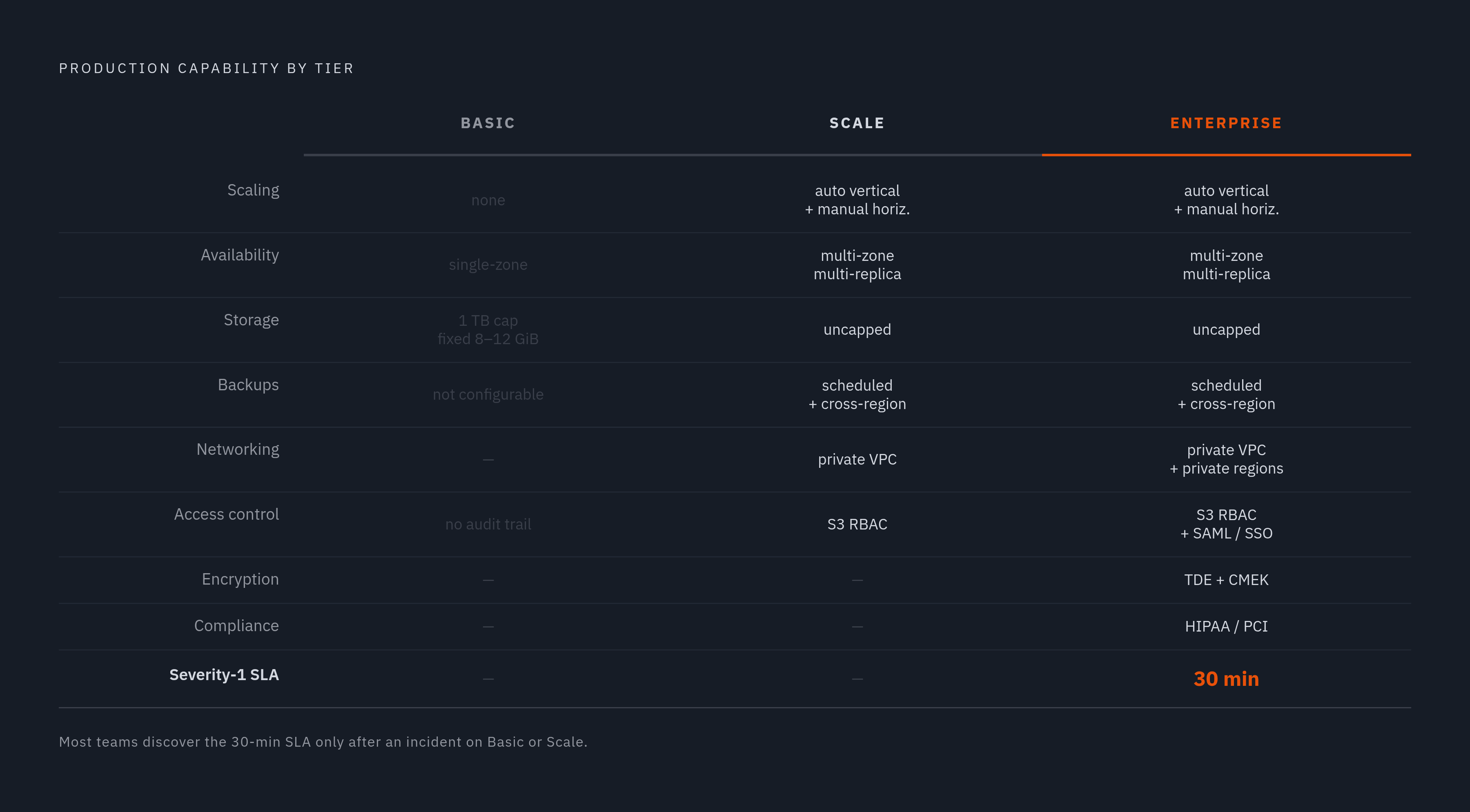
Basic tier cannot scale, manually or automatically. That's a complete architecture, not a starter kit missing a few features. It's built for workloads that don't need to grow and can tolerate a zone going down.
Scale tier changes the shape of the deployment. It runs across two or more availability zones with multi-replica deployments, adds automatic vertical scaling and manual horizontal scaling, separates compute from storage in a compute-compute configuration, and opens up configurable backup schedules, private networking, and role-based access to S3. These are the mechanics that let a service absorb a traffic spike or survive a zone outage without a human intervening at 3 a.m.
Enterprise tier builds further on top of that: SAML and SSO, private regions, transparent data encryption, customer-managed encryption keys, HIPAA and PCI compliance, scheduled upgrades, and a named lead support engineer. It also carries a 30-minute response time SLA for Severity-1 issues, a guarantee absent from both tiers below it.
The gap between what the lower tiers withhold and what a serious incident demands is wide enough that an entire third-party support market exists to fill it. A managed database support provider, for instance, publishes its own SLA for managed deployments: fifteen minutes for Severity-1, twelve hours for Severity-2, twenty-four hours for Severity-3, and forty-eight hours for Severity-4. That a third party built a business around plugging this specific hole says something about how much incident-response capability sits locked behind the tier wall.
The jump in cost between lower support tiers and the next tier up
Basic cannot scale at all, manually or automatically, and it's a forced change in configuration that reshapes the entire bill, so teams that hit Basic's fixed ceiling mid-growth end up paying for that reshape at the worst possible time.
Consider the numbers. A Basic deployment run at moderate daily uptime costs tens of dollars a month. Scale entry configurations start closer to $499.38 a month. That jump comes from bigger configurations and multi-replica requirements the tier forces, not from the per-unit compute rate moving on its own. Compute is the only line that shifts with uptime, and running Basic continuously costs nearly three times the headline figure most teams anchor on when they size the deployment.
A team that budgets off the headline Basic price, then runs a real production workload around the clock, has already tripled its compute bill before it even touches the scaling ceiling. And once load exceeds that fixed ceiling, there's no incremental path forward. The only option is a jump straight to Scale, which restructures the bill wholesale: more replicas, a higher per-unit compute rate, and a multi-zone footprint that Basic never had.
The compute rate differential between Basic and Enterprise is real and substantial on its own. But that number matters less than the configuration change the tier forces on a team the moment it needs to scale, and that jump rarely happens during a calm planning cycle. It happens during a production incident, a growth spike, or a launch, at exactly the moment a team has the least room to absorb a sudden multiple on its infrastructure bill.
The secondary billing dimensions that compound the tier decision
Storage, egress, ingestion, and backups are independent meters, and each interacts with what a given tier will let a team do with them.
Storage prices identically across every tier, at $25.30 per compressed terabyte per month, whether the deployment is Basic, Scale, or Enterprise. Moving tiers doesn't touch that rate. What changes is what the service is allowed to do with the data sitting in it.
Backups bill at that same per-terabyte rate, and by default one copy is retained, which quietly doubles the storage line for anyone who doesn't account for it. Configurable backup retention, the lever that lets a team control that cost, only exists on Scale and Enterprise. Basic teams have no say in it.
Managed ingestion through tools like ClickPipes adds its own per-GB and per-compute-unit charges, structurally similar to the kind of API and retrieval fees a 2025 CloudZero report flagged as a leading source of surprise spend for data-heavy applications. And cross-region replication, along with inter-region transfer more broadly, is a Scale and Enterprise capability. Teams that need geographic redundancy learn its cost only after the tier decision has already forced their hand.
None of these meters is a trap by itself. Each of these meters interacts with tier capability in ways a rate-card comparison doesn't surface, and a team that budgets carefully for compute can still get blindsided by one of them.
Why teams underestimate the tier their production workload requires
Most evaluations start on Basic because it's the path of least friction to get something running. That's reasonable for a proof of concept. Basic functions as a development or staging environment, not a production tier, and its real limits, single-zone architecture, fixed memory, no autoscaling, a 1 TB cap, stay invisible until production load actually arrives. At that point, the minimum viable production configuration starts at $499.38 a month for Scale tier.
Availability requirements get skipped over the same way. A single-zone deployment with no failover is perfectly fine for a proof of concept and unacceptable for anything customer-facing. Teams tend to learn that distinction during an actual incident rather than during procurement, when the fix would have been a checkbox instead of a scramble.
Compliance is another blind spot. HIPAA, PCI, CMEK, SAML and SSO all live on Enterprise, and during initial evaluation they get treated as someday problems. Lock into Scale without accounting for them, and the moment compliance requirements actually materialize, that's a second tier migration, not a configuration tweak.
Agentic workloads speed all of this up. AI agents querying a database at machine speed exhaust Basic's fixed compute ceiling of 8-12 GiB of memory far faster. Teams building AI-first products on Basic are testing the wrong product. That point deserves its own full treatment, and it gets one next.
The SLA gap follows the same pattern of arriving late. A team that never contracted for the 30-minute Severity-1 response finds out what tier it actually bought during a production outage, not during the sales call. The information that should have shaped tier selection tends to surface exactly when it's most expensive to act on.
Agentic query workloads and tier limits
An AI agent is a fundamentally different kind of database user than a human analyst. Agents generate query volumes, access patterns, and compliance demands that put Basic's fixed compute ceiling and Enterprise's audit controls in play at the same time, in a way human workloads simply don't.
What does agentic scale actually look like once it's running in production? An internal deployment offers a data point: a large majority of employees use the platform daily, it handles most of the company's internal data warehouse queries, and it processes more than 45 million tokens a day. Daimler Truck runs a comparable pattern at enterprise scale, operating a company-wide AI platform on LibreChat with thousands of employees and thousands of agents active in production.
The infrastructure for exposing a database to agents is built for exactly this. A remote MCP server gives external agents a standard interface to list databases and tables, inspect schemas, and run scoped, read-only SELECT queries, implementing the MCP specification with OAuth authentication. But fine-grained role-based access control and the full audit trail of what an agent actually did are tier-gated capabilities, not something every deployment gets by default.
Put an agent workload against a Basic tier service, and two problems occur at once. There's no autoscaling to absorb the query volume, and there's no access control or audit trail to make the agent's actions accountable after the fact. Query volume and accountability turn out to be the same problem viewed from two different angles, and Basic solves neither.
Billing structure adds a third layer to this. Where pricing runs per-query rather than per-compute-capacity, an agent's tendency to probe, retry, and explore becomes a direct cost penalty rather than a predictable expense. High-volume agentic curiosity, in that kind of pricing model, turns into runaway spend instead of a line item a team can forecast.
Limits of schema design and query optimization
Schema design and query tuning are genuine cost levers. They also have a hard ceiling, and understanding where that ceiling sits matters as much as knowing the techniques themselves.
MergeTree is the right engine for the overwhelming majority of analytical workloads, and stepping away from it tends to impose costs a given tier has no room to absorb. Using LowCardinality on columns with a bounded set of distinct values, repeated across billions of rows, cuts storage meaningfully and speeds up GROUP BY queries, compounding whatever savings compression already provides.
Partitioning strategy carries a direct cost consequence, too. Partitioning by time interval, month or week, lets the system skip entire partitions when a query only needs recent data. Partition instead by something high-cardinality, like campaign, channel, or user_id, and that skipping benefit disappears, increasing scan cost.
For observability workloads specifically, schema design that takes advantage of column-store narrowness matters a great deal. A query for p99 latency by service only needs to read two columns, no matter how many columns the table actually holds. Get the schema wrong and force wider scans, and compute cost multiplies on every single query that runs against it.
Keeping data current without fighting the engine has its own tools, too. ReplacingMergeTree handles deduplication during background merges, keeping either the row with the highest value in an optional version column or simply the most recently inserted row. Lightweight Updates handle individual row corrections with minimal overhead. Both let a team avoid mutation-heavy patterns that work against how the storage engine is built to operate.
None of it touches the tier ceiling, though. Schema and query choices don't add autoscaling, don't add a second availability zone, don't shorten a Severity-1 response window, and don't turn on RBAC audit trails, because every one of those is a tier decision, not a schema decision. Optimization multiplies what a given tier can deliver. It doesn't substitute for the tier a workload actually needs.
Evaluating managed database cost with tier requirements as a first-order input
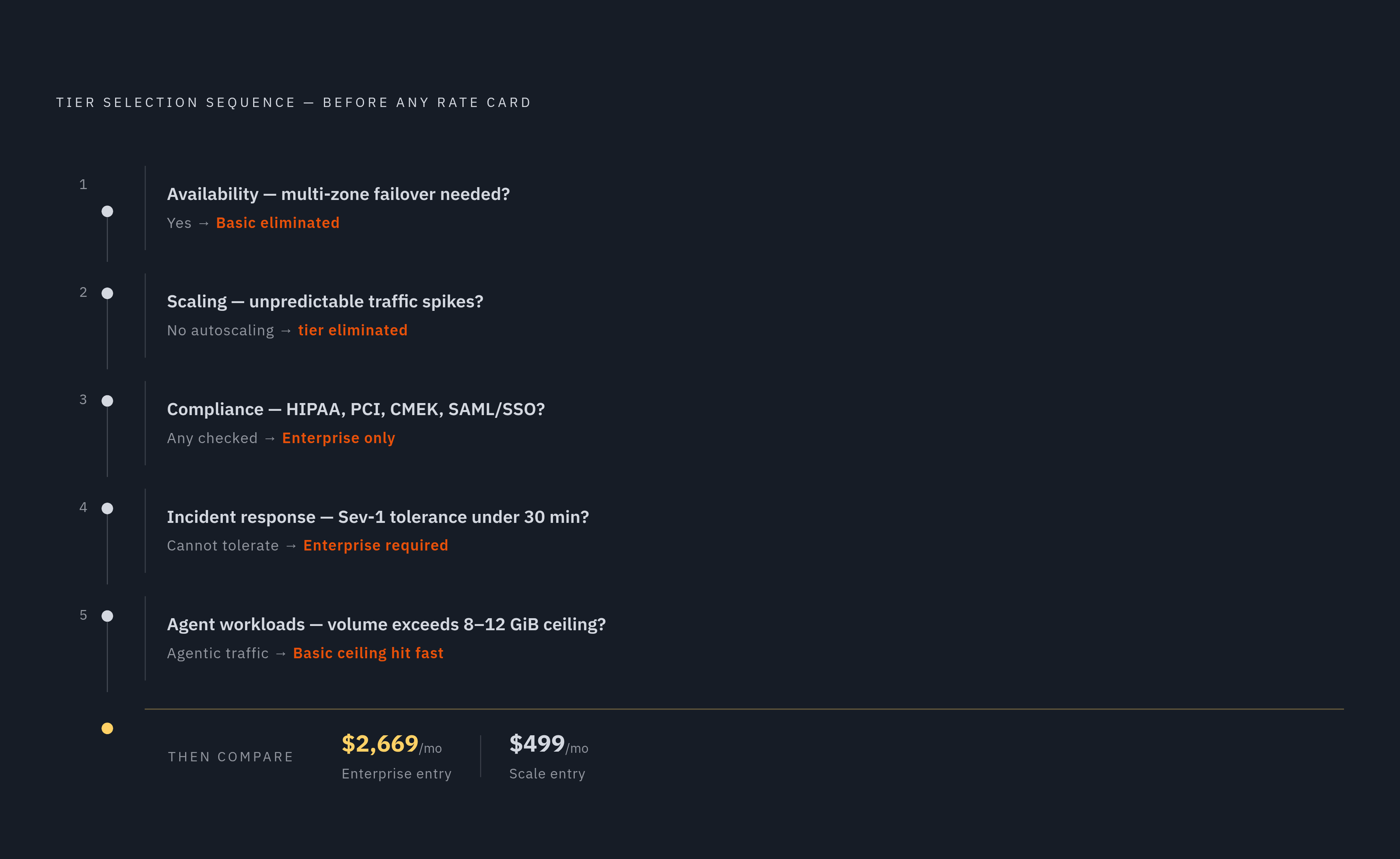
A cost evaluation that starts with compute and storage rates and only later gets around to tier requirements has the sequence backwards. Production requirements set the minimum viable tier first, and the tier then determines what the compute rate is actually paying for, with Enterprise configurations starting around $2,669 a month. Asking the questions in the right order turns the rate card from a mystery box into a confirmation of something already decided.
Start with availability. Does the workload need multi-zone failover? If the answer is yes, Basic isn't on the table no matter how attractive its compute rate looks. Scale becomes the minimum viable tier, and rate-shopping among tiers cannot change that requirement.
From there, state the scaling requirement in plain terms. Is peak load predictable, or does it spike unpredictably? If it spikes, autoscaling is a production requirement, not a feature to bolt on later. It's a production requirement, and any tier that lacks it is not actually a candidate, regardless of what its headline price suggests.
Compliance needs deserve the same treatment, asked before signing rather than after.
Incident response belongs in the same conversation. A team that cannot tolerate an open-ended wait during a Severity-1 outage needs to know, before signing anything, whether its tier includes the 30-minute response guarantee, or whether it's relying on a slower default and hoping nothing breaks at the wrong hour.
Agent workloads need to be named explicitly rather than folded into a generic "growth" category, because agentic query volume behaves nothing like human analyst traffic and will find the edges of a tier's compute ceiling far sooner than a team expects. Run through availability, scaling, compliance, incident response, and agent load in that order, before a single compute rate gets compared, and the tier decision stops being a surprise that arrives mid-incident. It becomes the first fact established, with everything else in the bill following from it.